
Download Cheque Print Lite – Free Mac Cheque Printing Tool for Business & Finance
Overview
Cheque Print Lite is a lightweight, free Mac application designed by Moon Technolabs Private Limited to simplify the creation and printing of bank cheques. Positioned in the Business & Productivity category with a Finance sub‑category, the software targets small businesses, accountants, and freelancers who need a reliable, no‑cost solution for generating printable cheques that meet local banking standards. The current version, 3.9, was last updated on December 13 2016, and it runs on macOS X as well as earlier Mac OS releases. Despite its modest age, Cheque Print Lite remains popular in regions such as France and Singapore, where it has accumulated more than 16 installations since its inclusion in the software catalog in 2000. Its user interface is offered in English, and the program’s footprint is intentionally small, making it an ideal choice for users who want a secure, offline tool without the overhead of subscription‑based services.
What sets Cheque Print Lite apart from generic word‑processor templates is its built‑in cheque layout engine, which automatically aligns numeric amounts, textual amounts, dates, and signature fields according to the selected bank’s format. The tool also includes basic data validation to prevent common errors like mismatched totals or incorrect date formats. Because the software is free and does not require an internet connection for core functionality, it aligns well with privacy‑focused businesses that handle sensitive financial data. In this review we’ll explore the key features, walk through the installation process, examine system compatibility, and weigh the pros and cons to help you decide whether Cheque Print Lite is the right cheque‑printing companion for your Mac.
Core Features of Cheque Print Lite
- Pre‑built cheque templates: Includes a library of common Indian, US, UK, and European cheque layouts that can be customized with your company logo and bank details.
- Automatic amount conversion: Converts numeric values into words in real time, reducing the risk of transcription errors.
- Data validation checks: Flags missing fields, incorrect date formats, and mismatched totals before printing.
- Batch printing support: Allows users to import a CSV file with multiple cheque records and print them in one operation.
- Print preview mode: Provides a high‑resolution preview so you can verify alignment on the actual cheque paper before committing to a print job.
- Secure offline operation: All processing occurs locally; no data is transmitted to external servers.
- Multi‑language support (English only for now): While the UI is English‑only, the amount‑to‑words engine supports numeric conversion for several languages in future updates.
- Lightweight installer: The installer size is minimal, keeping your Mac’s storage footprint low.
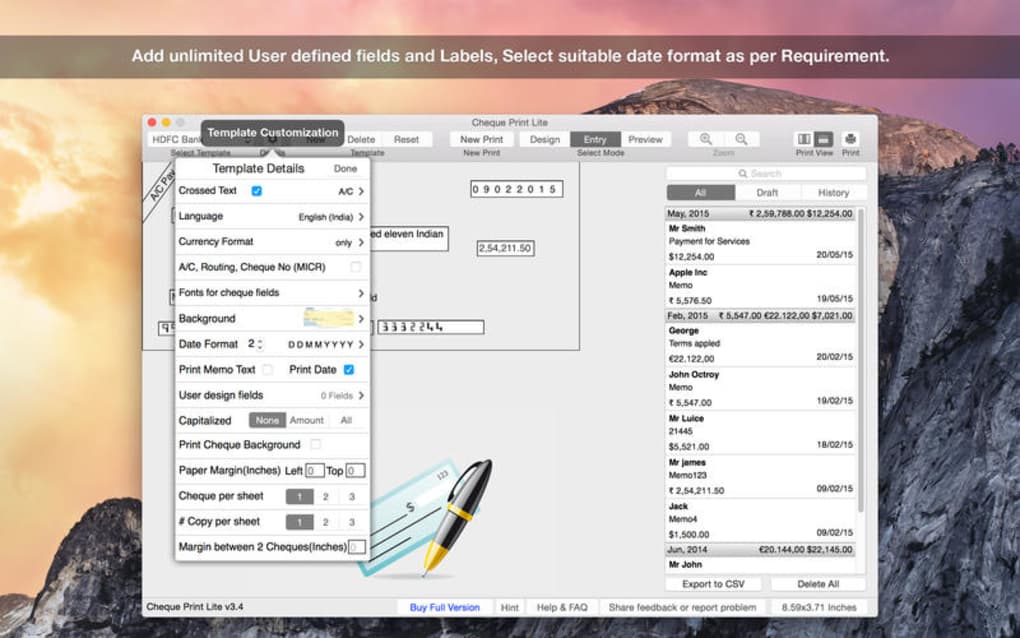
Beyond the basic checklist, Cheque Print Lite shines in its simplicity. The interface follows the classic macOS design language, with clean menus and drag‑and‑drop support for adding a logo. Users can also define custom fields such as “Payee Reference” or “Invoice Number,” which are especially useful for accountants who need to track payments against specific jobs. While the software does not include advanced accounting features like ledger management, its focused approach means you won’t be overwhelmed by unnecessary menus or subscription pop‑ups. For businesses that already use accounting suites such as QuickBooks or Xero, Cheque Print Lite can act as a complementary printing tool, handling the final step of cheque generation without requiring a full ERP system.
Security‑conscious users will appreciate that the program stores no personal data in the cloud. All cheque data is saved locally in a simple XML format, which you can back up or delete at will. The lack of internet dependencies also means the software works reliably on air‑gapped machines, a scenario common in financial institutions that restrict external network access. Lastly, the free licensing model ensures that small firms or individual freelancers can adopt the tool without worrying about recurring fees, making it a cost‑effective alternative to premium cheque‑printing suites that charge per seat or per print.
Installation & Usage Guide
Step‑by‑Step Installation
- Visit the official Moon Technolabs website or a trusted Mac software repository and click the “Download Cheque Print Lite” button. The file will be a
.dmgimage. - Open the
.dmgfile and drag the Cheque Print Lite icon into your Applications folder. - On first launch, macOS may display a warning because the app is from an unidentified developer. Go to System Preferences > Security & Privacy, click “Open Anyway,” and confirm.
- The installer will create a support folder in
~/Library/Application Support/ChequePrintLitewhere templates and saved cheque files are stored. - Run the application. The initial setup wizard will ask you to select your default bank template and configure basic preferences such as default paper size (A4, Legal, or custom cheque stock).
Creating Your First Cheque
Once installed, the workflow is intuitive:
- Select a template: From the “File > New Cheque” menu, choose a template that matches your bank’s format. You can also import a custom template by clicking “Import Template” and selecting a PDF or image file.
- Enter cheque details: Fill in fields for payee name, amount, date, and purpose. The amount‑to‑words box updates automatically as you type.
- Attach your logo: Drag a PNG or JPEG file onto the designated logo placeholder. The software automatically scales the image to fit the allocated space.
- Preview and print: Click the “Print Preview” button to view a full‑size simulation. If everything aligns, choose your printer and paper type, then click “Print”.
- Batch processing (optional): For multiple cheques, prepare a CSV file with columns matching the required fields (Payee, Amount, Date, etc.). Use “File > Import Batch” to load the data and print all records in one pass.
The program also offers a “Save as Draft” feature, which stores the cheque data in the support folder for later editing. This is handy when you need to postpone a payment or double‑check figures with a client before printing. Because the software runs locally, the save operation is instantaneous and does not rely on cloud sync, which keeps your financial data private.
Troubleshooting Common Issues
If you encounter alignment problems, verify that your printer settings match the cheque paper dimensions (e.g., “Letter” vs “Legal”). Adjust the “Margin” values in the preferences dialog to fine‑tune positioning. For missing fonts or garbled characters, ensure that the system’s default English font (Helvetica Neue) is installed, or switch to a compatible TrueType font via the “Font Settings” menu. Should the application fail to launch due to macOS security restrictions, re‑grant permission in the “Security & Privacy” panel or reinstall the latest .dmg from the official source.
Compatibility, Pros & Cons
System Compatibility
Cheque Print Lite is built for macOS X and supports legacy versions back to macOS 10.6 Snow Leopard. It runs natively on Intel‑based Macs and, thanks to Apple’s Rosetta 2 translation layer, also works on Apple Silicon (M1/M2) machines without performance loss. The software does not require any additional runtime environments such as Java or .NET, making it a true “plug‑and‑play” solution for Mac users.
Pros
- Free of charge: No licensing fees, subscriptions, or hidden costs.
- Lightweight and fast: Minimal RAM usage; launches in under two seconds.
- Offline security: All data stays on your local machine, ideal for privacy‑sensitive environments.
- Built‑in validation: Reduces errors before printing, saving time and paper.
- Batch printing capability: Handles large volumes of cheques with a simple CSV import.
- Customizable templates: Adapt existing layouts or create new ones to match any bank’s specifications.
Cons
- Outdated UI: The visual design follows older macOS conventions and may feel dated compared to modern apps.
- Limited language support: Currently only English UI; amount‑to‑words conversion for non‑English languages is not available.
- No direct integration with accounting software: Users must manually export/import data.
- Last update in 2016: Potential compatibility issues with future macOS releases, though none reported to date.
- Missing cloud backup: All data is local; users must implement their own backup strategy.
Frequently Asked Questions
Is Cheque Print Lite compatible with the latest macOS Ventura?
Yes. Although the last official update was in 2016, Cheque Print Lite runs smoothly on macOS Ventura (13) and later versions, thanks to Apple’s backward‑compatibility layers. Users have reported successful installations on both Intel and Apple Silicon Macs.
Can I import cheque data from QuickBooks or Xero?
Direct integration is not built into Cheque Print Lite. However, you can export cheque data from QuickBooks or Xero as a CSV file and then use the “Import Batch” feature to print multiple cheques at once.
Is there a way to back up my saved cheques?
All cheque files are stored in ~/Library/Application Support/ChequePrintLite. You can copy this folder to an external drive or use Time Machine to back up the data regularly.
Does the free version place any watermarks on printed cheques?
No. Cheque Print Lite is a completely free tool and does not add watermarks or branding to your printed cheques. The only branding you’ll see is the optional logo you choose to place on the cheque.
What paper types are supported for printing?
The application supports standard cheque stock sizes such as A4, Letter, and Legal, as well as custom dimensions. You can set the exact paper size in the preferences dialog to match the specifications of your bank’s cheque paper.
Conclusion & Call to Action
Cheque Print Lite delivers exactly what its name promises—a lightweight, free, and secure solution for printing cheques on a Mac. Its core strengths lie in the pre‑built templates, automatic amount‑to‑words conversion, and offline operation, which together reduce the risk of errors while keeping costs at zero. While the UI could benefit from a modern refresh and the lack of direct accounting software integration may be a drawback for some, the program remains an excellent fit for small businesses, freelancers, and accountants who need a reliable, no‑frills cheque‑printing tool.
If you’re looking for a cost‑effective way to generate professional‑looking cheques without subscribing to expensive cloud services, Cheque Print Lite is worth a try. Download the installer today, set up your bank’s template, and start printing secure cheques in minutes. Remember to back up the Application Support folder regularly to protect your financial records.
Ready to simplify your cheque workflow? Click here to download Cheque Print Lite for free and experience hassle‑free cheque printing on macOS.







